Q2
Q2
 QIDI Box
 Plus 4
 Q1 Pro
 X-Max 3


What Are the Benefits of an Enclosure for a 3D Printer?

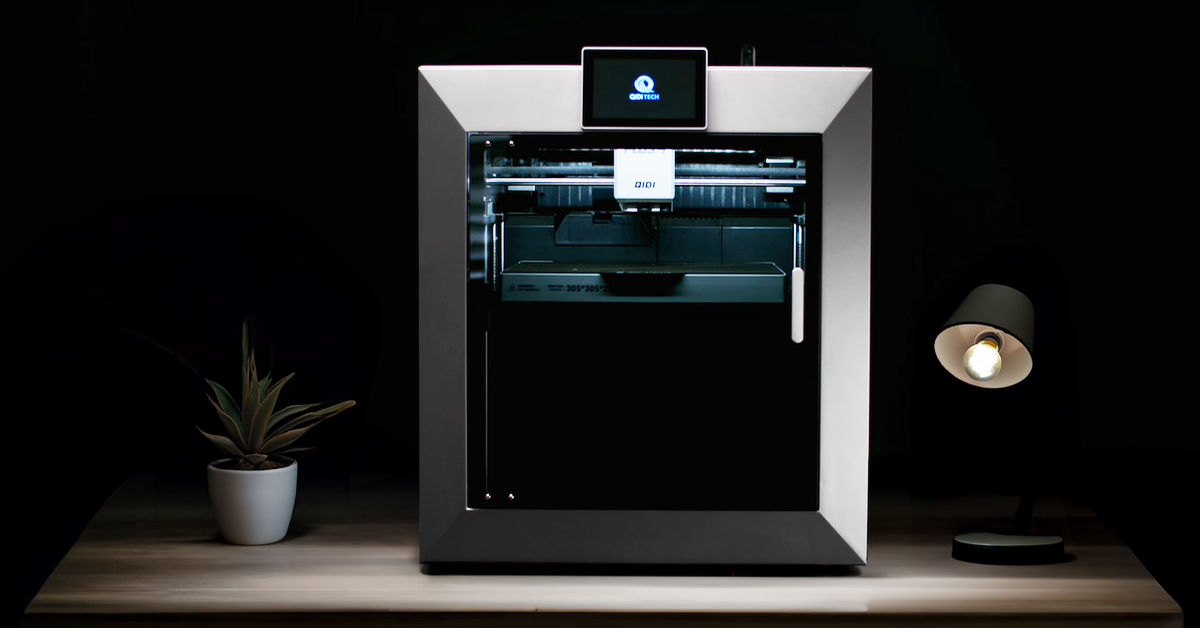
A 3D printer enclosure is a physical barrier around the build volume that blocks drafts, traps heat, contains odour and particles, and muffles noise. A heated chamber is a different thing: it adds a dedicated heater and sensor that hold the air at a commanded temperature. Every heated chamber is an enclosure; most enclosures are not heated chambers.
That distinction is the single most blurred point in 3D printer marketing, and it decides whether you can actually print ABS, ASA, polycarbonate, or nylon reliably. This guide separates what a plain box does from what an actively heated chamber adds.
What Is a 3D Printer Enclosure?
A 3D printer enclosure is a closed structure — acrylic, sheet metal, fabric, or moulded panels — surrounding the printer so that the air inside the build volume is isolated from the room. It has no active temperature control. Whatever warmth it holds comes from the heated bed and hotend leaking heat into the trapped air.
Enclosures come in three forms:
- Aftermarket boxes and tents that wrap an open-frame printer.
- Integrated passive enclosures, where the printer ships as a closed box with no chamber heater.
- Active heated chambers, where an integrated enclosure is paired with a PTC heater, a circulation fan, and a chamber thermistor.
The third category is the only one that can hold a target temperature. The first two drift with room conditions, print duration, and how much of the bed is covered.
Passive Enclosure vs Active Heated Chamber
A passive enclosure stabilises the air around a print; an active heated chamber sets it. The practical gap between those two verbs is what determines whether a 200 mm-tall ABS part survives.
| Capability | Passive enclosure | Active heated chamber |
|---|---|---|
| Blocks room drafts and air-conditioning | Yes | Yes |
| Contains odour and airborne particles | Yes | Yes |
| Reduces perceived fan and motor noise | Yes | Yes |
| Keeps dust off rails, belts, and filament | Yes | Yes |
| Raises internal air temperature | Somewhat — passively, by trapped bed and hotend heat | Yes, to a commanded setpoint |
| Holds a repeatable internal temperature | No — it drifts with room temperature, print size and duration | Yes, closed-loop against a chamber sensor |
| Reaches temperature before layer one | No — it warms up over the first hour of the print | Yes, chamber preheat runs before printing starts |
| Reliable interlayer bonding on tall ABS/ASA/PC parts | Improved, not solved | Yes, this is the main reason it exists |
| Typical achievable internal temperature | Roughly 30–45 °C, uncontrolled, depending on bed temperature and room | Set and held — 65 °C on QIDI's current heated models |
Read the row about repeatability twice. A passive enclosure that happens to reach 40 °C in a warm workshop in July may sit at 28 °C in a cold garage in January, on the same printer with the same file. Engineering materials do not care what the box is made of; they care what the air temperature is.
QIDI's current lineup makes the difference concrete. The Q2C ships with a flame-retardant enclosed chamber but no chamber heating — its spec sheet lists chamber temperature as none. The Q2, Plus 4, and Max4 all carry independent PTC chamber heating rated to 65 °C. Same brand, same generation, two genuinely different capabilities. Our article on the temperature-controlled chamber goes deeper on the control side, and open versus enclosed printers covers the buying decision.

What an Enclosure Fixes in Print Quality
Enclosures fix problems caused by uneven cooling: corner lift, layer separation on tall parts, and dimensional drift between the bottom and top of a model. They do nothing for problems caused by calibration, moisture, or a clogged nozzle.
The mechanism is straightforward. As each layer cools it contracts. If the layer below has already cooled fully while the new layer is still hot, the mismatch loads the bond between them. Enough of that stress and the part either peels off the plate at a corner or splits along a layer line halfway up. Keeping the surrounding air warm slows that cooling gradient, which lets the stress dissipate instead of accumulating.
| Material | Passive enclosure | Active 50–65 °C chamber | Why |
|---|---|---|---|
| PLA | Neutral to slightly harmful | Harmful | PLA needs aggressive cooling; a hot chamber softens overhangs and causes heat creep in the extruder. |
| PETG | Neutral | Not needed | PETG barely warps; it wants moderate cooling, not warmth. |
| ABS | Meaningful improvement on small parts | Required for tall or large parts | High shrinkage; layer splitting starts above roughly 100 mm without chamber heat. |
| ASA | Meaningful improvement | Required for tall or large parts | Behaves like ABS but is even more draft-sensitive. |
| Polycarbonate | Not sufficient | Effectively required | Very high processing temperature and shrinkage; cold air causes immediate delamination. |
| Nylon (PA, PA-CF) | Helps | Strongly recommended | Warps and cracks between layers; dry filament matters as much as chamber temperature. |
| TPU | Neutral | Not needed | Flexible materials do not build meaningful shrinkage stress. |
Note the first two rows. An enclosure is not a universal upgrade — for PLA it is at best neutral, and a genuinely hot chamber makes PLA worse. Printers with active chambers let you set chamber temperature to zero for exactly this reason. If your material list is PLA and PETG, an enclosure is an odour, dust, and noise purchase, not a quality one.
Where an enclosure does help, the downstream benefits are dimensional. Parts that cool evenly hold tolerance better across the build height, which matters for anything that has to fit something else — the trade-offs are covered in our tolerances guide. For nylon specifically, our test notes on how chamber heating prevents nylon cracking show what the failure looks like when the chamber is not there. And for the ABS and ASA case, stopping warping in ABS and ASA prints works through the full checklist.
Odour, Particles, and Air Quality
FDM printers emit ultrafine particles and volatile organic compounds while extruding, and an enclosure contains them rather than eliminating them. Removing them requires filtration or ventilation; a sealed box on its own just changes where they end up.
The measurements are well documented. A published meta-analysis of FDM particle emissions reported mean particle number concentrations of about 300,980 particles/cm³ for ABS versus 65,482 particles/cm³ for PLA, with the majority of particles in both cases being ultrafine — under 100 nm. The same analysis found nozzle temperature to be a significant driver, which partly explains the gap, since ABS is normally run hotter than PLA.
Containment plus filtration is what actually reduces exposure. A NIOSH study of a low-cost engineering control — a capture hood with a HEPA filter and a charcoal bed fitted to desktop printers — reported a 98% reduction in ultrafine particle concentration, with peak levels falling from 26,000 particles/cm³ to 390 particles/cm³. The lesson for buyers is specific: look for whether an enclosed printer includes an activated-carbon or HEPA filter, not just whether it has doors.
Practical guidance, without overclaiming:
- Use an enclosure with filtration if the printer shares a room with people for long periods.
- Ventilate the room regardless. The EPA's guidance on VOCs and indoor air quality is a reasonable baseline for how to think about indoor sources generally.
- Higher nozzle temperatures mean higher emissions, so material choice matters as much as hardware.
- Low-odour ABS formulations exist and help with the smell specifically — QIDI's odour-reduced ABS is one option — but reduced smell is not the same as reduced particle emission.
Our companion article on 3D printer fumes and safety covers ventilation setups in more detail.
Noise, Dust, and Physical Separation
An enclosure reduces perceived noise, keeps airborne dust off rails and belts, and puts a physical barrier between hands and hot components. These are the benefits that apply regardless of what material you print.
Noise. Fans and stepper motors produce mid- and high-frequency sound that panels attenuate effectively. Low-frequency vibration transmitted through the bench is not affected by an enclosure — for that, the fix is a heavy slab or a foam mat under the machine. The combination of the two is what makes overnight printing near a bedroom tolerable.
Dust. Rails, lead screws, and belts collect airborne dust, and dust plus lubricant makes an abrasive paste. An enclosure slows that accumulation considerably, which reduces how often you need to clean and re-lubricate. It also keeps dust off the filament path, and dust on filament ends up in the nozzle — see our nozzle maintenance guide for what that leads to.
Physical separation. Nozzles on current machines run to 370 °C and beds to 120 °C. Panels and a door reduce the chance of accidental contact with hot surfaces or moving belts, which matters most in shared spaces, classrooms, and homes with children or pets. This is a meaningful risk reduction, not an absolute guarantee — supervision and sensible placement still apply, as covered in our printer safety guide.

How to Get an Enclosure: Buy, Build, or Buy Enclosed
Aftermarket enclosures solve odour, dust, and noise well and temperature control poorly; an integrated heated chamber is the only route to a repeatable chamber temperature. Choose based on which problem you actually have.
Ready-made kits range from basic acrylic panel sets to insulated cabinets. What to check: internal clearance for the printer's full range of motion, whether a bed-slinger's bed will collide with the walls, cable pass-throughs, door design, and whether filtration is included. A CoreXY printer fits far more easily than a bed-slinger, because nothing sweeps outside the frame during a print — one of the practical consequences of the architecture explained in our CoreXY guide.
DIY builds are cheaper and fully customisable. Common approaches use acrylic sheet, aluminium extrusion, or a repurposed cabinet. Points that catch people out:
- Electronics and stepper motors need to stay cool. A sealed box that traps heat around the mainboard causes thermal shutdowns and shortens component life. Vent the electronics bay separately from the build volume.
- PLA parts should not be used for enclosure brackets that will sit in a warm chamber. PLA softens near 60 °C.
- Plan cable pass-throughs before cutting panels, and add LED lighting — a closed box is a dark box, and you will want to see the first layer.
- Add a window. Being able to watch a print without opening the door is worth more than it sounds.
Buying an already-enclosed printer avoids all of that and is the only way to get chamber heating that the firmware knows about. Integrated designs also handle the airflow problem properly: they can run the part cooling fan hard inside a warm chamber, which a DIY box cannot coordinate. QIDI's enclosed CoreXY range spans both approaches — the Q2C with a flame-retardant unheated chamber, and the Q2, Plus 4, and Max4 with active 65 °C chamber heating for the engineering filaments that need it.

Frequently Asked Questions
Do I need an enclosure for my 3D printer?
You need one if you print ABS, ASA, polycarbonate, or nylon, or if the printer shares a room with people who would rather not smell it. You do not need one for PLA and PETG on print quality grounds — for those materials an enclosure is about odour, dust, and noise.
What is the difference between an enclosure and a heated chamber?
An enclosure is a passive barrier that traps whatever heat the bed and hotend give off. A heated chamber adds a dedicated heater and a temperature sensor so the printer can hold the air at a set value, typically 50–65 °C, and reach it before the first layer starts. Only the second gives repeatable results on tall ABS or PC parts.
Does an enclosure help with PLA?
Not for print quality. PLA needs strong part cooling, and a warm enclosure works against that — overhangs droop and the extruder is more prone to heat creep. An enclosure still helps with dust, noise, and containment. If your printer has an active chamber, set the chamber temperature to zero for PLA.
Will an enclosure stop 3D printer fumes?
It contains them, which is different from removing them. Published measurements show FDM printing releases mostly ultrafine particles under 100 nm along with VOCs, and a sealed box concentrates rather than eliminates them. Reducing exposure needs filtration — activated carbon for odour, HEPA for particles — plus room ventilation.
Can I make my own 3D printer enclosure?
Yes, and for odour, dust, and noise a DIY box performs about as well as a commercial one. The two things DIY builds usually get wrong are trapping heat around the mainboard and using PLA-printed brackets that soften inside a warm chamber. Vent the electronics separately and print structural parts in PETG or ABS.
How hot does a 3D printer enclosure get?
A passive enclosure typically drifts to somewhere around 30–45 °C, driven by bed temperature, print duration, and room conditions — it is not a controlled value. An actively heated chamber holds whatever you set, up to 65 °C on QIDI's current heated models.
Is an enclosed 3D printer safer?
An enclosure reduces specific risks: accidental contact with a 370 °C nozzle or a 120 °C bed, contact with moving belts, and dispersal of particles into the room. It reduces those risks rather than removing them, and it does not replace supervision, a smoke alarm, or sensible placement away from flammable material.
Read More
- What Is a 3D Printer Enclosure?
- Passive Enclosure vs Active Heated Chamber
- What an Enclosure Fixes in Print Quality
- Odour, Particles, and Air Quality
- Noise, Dust, and Physical Separation
- How to Get an Enclosure: Buy, Build, or Buy Enclosed
- Frequently Asked Questions
- Do I need an enclosure for my 3D printer?
- What is the difference between an enclosure and a heated chamber?
- Does an enclosure help with PLA?
- Will an enclosure stop 3D printer fumes?
- Can I make my own 3D printer enclosure?
- How hot does a 3D printer enclosure get?
- Is an enclosed 3D printer safer?
- Read More
Recommended products