Q2
Q2
 QIDI Box
 Plus 4
 Q1 Pro
 X-Max 3


CoreXY 3D Printers: How They Work and Why They're Popular

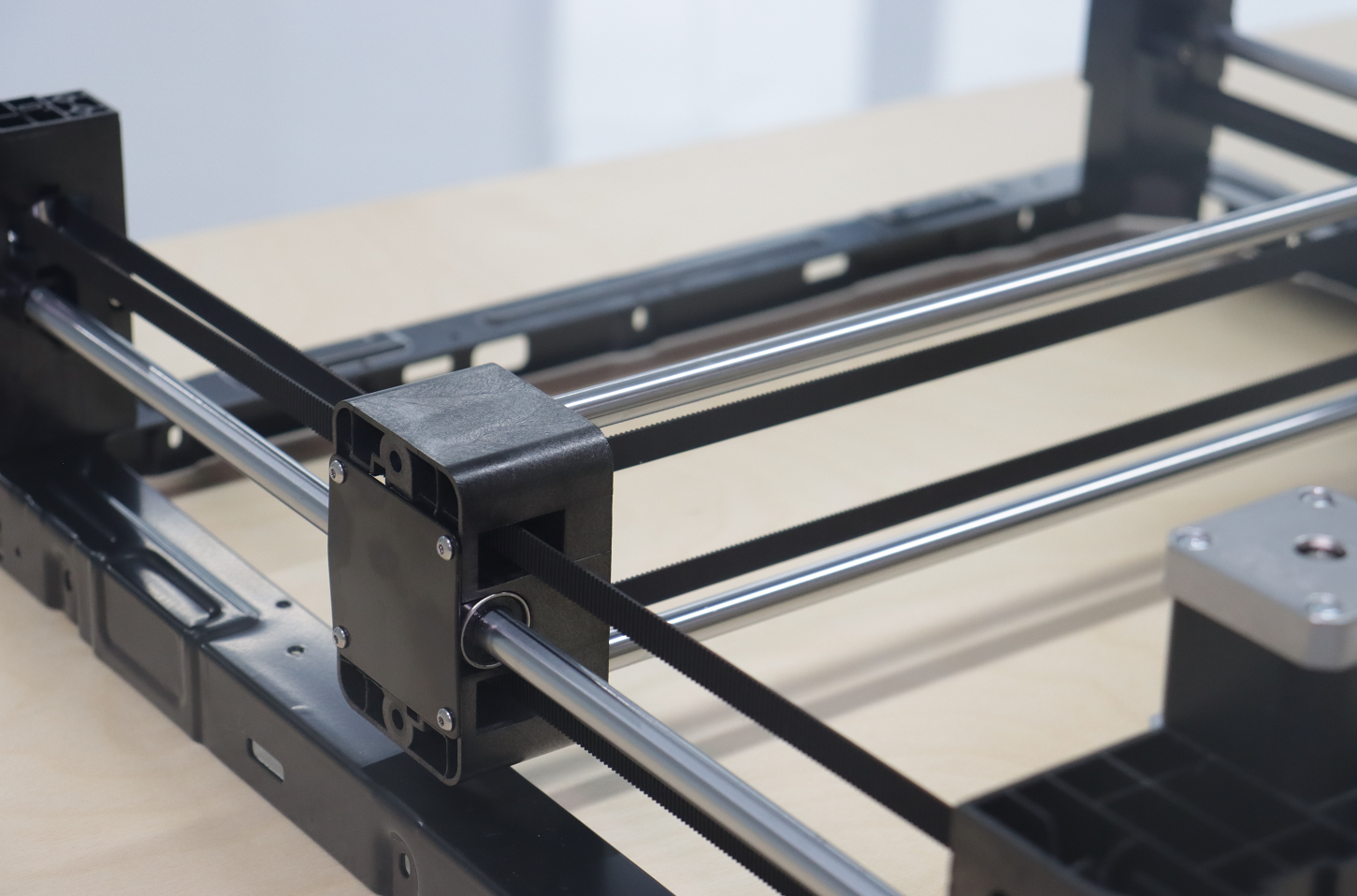
CoreXY is a motion system in which two stationary motors drive both the X and Y axes together through a crossed pair of timing belts. Neither motor owns an axis. Moving the toolhead in a straight line requires both motors to turn in a coordinated ratio, which is what lets the printer keep almost all of its mass off the moving carriage.
That single design decision is why CoreXY machines accelerate harder than bed-slingers, why they tolerate full enclosures, and why they are fussier to tension and square. This guide covers the belt path, the motion equations, the real advantages, and the costs nobody mentions in marketing copy.
What Is a CoreXY 3D Printer?
A CoreXY 3D printer is a printer whose horizontal motion is produced by two frame-mounted stepper motors coupled to the toolhead through two belts that cross in an H-shaped path, with the bed moving only vertically. The name comes from the open-source CoreXY mechanism published in 2013, now implemented in mainstream firmware including Marlin and Klipper.
Compare that with the two other common arrangements. In a Cartesian bed-slinger, one motor moves the toolhead left and right along X while a second motor drags the entire heated bed forward and backward along Y. In a delta, three vertical carriages move linked arms to position a single toolhead. CoreXY sits between them: parallel motor coupling like a delta, rectangular build volume like a Cartesian.
| Motion system | What moves in XY | Motor placement | Practical acceleration ceiling | Main cost |
|---|---|---|---|---|
| CoreXY | Toolhead only; bed moves in Z only | Both XY motors fixed to the frame | Very high — commonly 10,000–30,000 mm/s² on current consumer machines | Belt tension must be matched between two long belts; skew errors are harder to diagnose |
| Cartesian bed-slinger | Toolhead in X, whole bed in Y | X motor rides on the gantry; Y motor at the frame | Low to moderate — the moving bed limits it, and the limit worsens as the print grows | Tall prints wobble; Y acceleration must drop as part mass rises |
| Cartesian moving-gantry | Toolhead in X, gantry in Y | X motor rides on the gantry | Moderate — the gantry and one motor are moving mass | Heavier moving assembly than CoreXY for the same rigidity |
| Delta | Toolhead via three linked arms | All three motors fixed to vertical towers | High | Circular build area; calibration is trigonometric and unforgiving |
If you want the broader context of how these all sit inside the same extrusion process, start with what FDM 3D printing is and the overview of FDM printer types.
How the CoreXY Belt Path Works
A CoreXY printer uses two continuous timing belts, each routed from its own motor pulley, around idler pulleys at the frame corners, through the toolhead carriage, and back — with the two belt paths crossing without touching. Seen from above, the routing traces an H or a squared figure-eight, which is where the informal "H-bot" family name comes from.
Each belt follows the same general route:
- Out from its motor pulley at a rear corner of the frame
- Along the frame to an idler pulley at the opposite corner
- Across the gantry, through or attached to the toolhead carriage
- Around a second set of idler pulleys
- Back to the same motor pulley, closing the loop
The two loops mirror each other, which is what makes the coupling work. Idler pulleys are undriven wheels whose only job is to redirect belt travel and hold tension; a typical CoreXY has eight to twelve of them. Because the belts run at slightly different heights, or are routed to avoid contact, the paths cross without rubbing. The RepRap wiki entry on CoreXY documents both the same-plane and stacked routing variants and their respective trade-offs.

The critical structural point is that CoreXY adds pulleys specifically to balance the load on the carriage. In the simpler H-bot layout, a single belt applies a twisting moment to the gantry during motion, and the design relies on the stiffness of the linear rails to resist that twist. CoreXY's belt arrangement cancels that moment, so the carriage stays square without leaning on the rails to hold it there.
How Two Motors Produce X and Y Motion
In CoreXY, each motor position is a linear combination of the Cartesian coordinates rather than a copy of one of them. Klipper's firmware documentation states the relationship directly:
stepper_a_position = cartesian_x_position + cartesian_y_positionstepper_b_position = cartesian_x_position − cartesian_y_positionstepper_z_position = cartesian_z_position
Read backwards, that produces three behaviours you can verify by hand on any CoreXY printer with the motors unpowered:
Pure X movement: both motors turn the same direction at the same rate. The Y components of the two belt tensions oppose and cancel; the X components add, and the toolhead travels left or right.
Pure Y movement: the motors turn in opposite directions at the same rate. Now the X components cancel and the Y components add, so the toolhead travels front to back.
Diagonal movement: any other ratio of the two motor speeds produces a diagonal. Every curve, arc, and organic contour in a print is generated by continuously varying that ratio.
A useful consequence: because both motors contribute to every move, a pure X or Y move uses the combined torque of both motors, and a 45° diagonal uses only one. This is the opposite of a Cartesian machine, and it is why CoreXY printers are sometimes tuned with different acceleration limits along the diagonals. Marlin exposes the same coupling through its CoreXY configuration option, and Klipper's kinematics reference lays out how the transform is applied at the step-generation level.
Why CoreXY Printers Can Accelerate So Hard
CoreXY printers reach high acceleration because the only mass moving in the XY plane is the toolhead and the gantry — the motors, which are the heaviest single components, never move. Acceleration is force divided by mass, so removing mass from the moving assembly raises the ceiling directly.
On a bed-slinger the situation is worse than it first looks. The Y axis has to accelerate the bed, the build plate, and the print itself. A 400 g print means the Y axis is shifting 400 g more at hour six than it was at hour one, so a printer that starts clean can degrade as the job proceeds. CoreXY sidesteps that entirely: the bed moves only in Z, one layer at a time, at a speed where its mass is irrelevant.

Low moving mass is necessary but not sufficient. High acceleration excites the frame's resonant frequencies, which show up on the print as ghosting or ringing — repeated echo ripples after every sharp corner. Modern CoreXY machines solve this in firmware with input shaping, which pre-filters the motion commands to avoid exciting those frequencies. The Klipper resonance compensation documentation covers how the frequencies are measured and applied.
For reference points from real hardware: QIDI's current CoreXY lineup runs 20,000 mm/s² on the Q2 and Q2C with a 600 mm/s toolhead ceiling, rising to 30,000 mm/s² and 800 mm/s on the Max4, which uses closed-loop stepper motors and a 10 mm-wide belt to carry the extra load. Whether those numbers translate into usable print speed depends on hotend flow rate, not on the motion system — a point we work through in how fast 3D printing actually gets.
Why CoreXY Suits Enclosed, High-Temperature Printing
CoreXY geometry is naturally compatible with a sealed enclosure because the build volume is a fixed box — nothing sticks out of it during a print. A bed-slinger's bed sweeps forward and backward past the frame, so any enclosure has to be substantially deeper than the printer or the bed hits the wall.
That matters because engineering materials need a stable, warm chamber. ABS, ASA, polycarbonate, and nylon all shrink measurably as they cool, and uneven cooling turns that shrinkage into warping and layer splitting. A closed box holds heat; an actively heated chamber holds a specific temperature. The distinction is important enough that we cover it separately in what a temperature-controlled chamber does and in the enclosure benefits guide.
Keeping the motors outside the heated volume is a second, less obvious benefit of fixing them to the frame. Stepper motors lose torque as they heat, and their magnets degrade at sustained high temperature. A CoreXY layout naturally parks both XY motors at the frame's rear corners where they can be vented, which is part of why 60 °C-plus chambers are practical on this architecture. Materials like PET-CF and other reinforced engineering filaments in the QIDI filament range depend on that thermal stability to print without delamination.
The Costs of CoreXY Nobody Mentions
CoreXY's coupling means every mechanical error affects both axes at once, which makes the design harder to build, tension, and diagnose than a Cartesian printer. These are real trade-offs, not marketing caveats.
Belt tension must be matched, not just adequate. On a Cartesian printer, a slightly loose X belt causes slightly sloppy X motion. On CoreXY, unequal tension between the two belts skews the coordinate system: circles come out as ellipses and squares come out as parallelograms. Both belts have to be tensioned to the same value, and belt runs are long — often two to three metres per loop — so there is more belt to stretch.
Diagnosis is indirect. If a CoreXY prints a skewed part, the fault could be either belt, any of the idler pulleys, a loose motor pulley grub screw, or a frame that is out of square. The symptom does not point at one axis, because there is no one axis. Layer shifts have the same property — they can come from a belt slipping on either motor. Our guide to stopping layer shifts covers the diagnostic order.
More parts, more wear points. Ten-plus idler pulleys means ten-plus bearings that can develop play or noise. Belt paths crossing at close clearance means a misrouted belt can rub. None of this is difficult to maintain, but it is more than a bed-slinger has.
Z is a separate problem. CoreXY only solves XY. The Z axis is handled independently, usually by one to four lead screws lifting the bed or the gantry. Multi-screw Z systems need to stay synchronised, which is why current machines use independent Z motors with automatic gantry levelling.
Cost. Two matched belts, a dozen pulleys, linear rails, and a rigid frame cost more than one belt and a moving bed. The gap has narrowed dramatically — CoreXY now appears at entry-level prices — but at the very bottom of the market, bed-slingers still dominate for a reason.
Where CoreXY Actually Pays Off
CoreXY is worth the added complexity when print time, tall-part quality, or engineering materials matter — and matters less if you print small PLA models overnight. Being honest about that is more useful than claiming the architecture wins everywhere.
| Use case | Does CoreXY help? | Why |
|---|---|---|
| Rapid prototyping iterations | Substantially | Higher acceleration compresses the design loop; three iterations a day instead of one. |
| Tall, narrow parts | Substantially | No bed acceleration means no inertial rocking of the growing print. |
| ABS, ASA, PC, nylon | Substantially | Fixed build volume makes full enclosure and chamber heating practical. |
| Large flat parts in PLA | Moderately | Speed helps; thermal stability is less critical. |
| Small decorative PLA models | Marginally | Print times are short anyway and quality is dominated by cooling, not kinematics. |
| Absolute lowest purchase price | No | The mechanism costs more to build for the same build volume. |

Build volume efficiency is a related advantage worth noting. Because a CoreXY toolhead sweeps only inside the frame, the machine's external footprint is close to its build volume plus the frame — which is how the Max4 fits a 390 × 390 × 340 mm volume onto a desk. The earlier X-Max 3 is a useful technical reference point for how the same geometry was applied to large-format CoreXY machines.
Frequently Asked Questions
What does CoreXY mean?
CoreXY is the name of an open-source belt-and-pulley motion mechanism in which two fixed motors jointly drive both horizontal axes. The term refers to the mechanism, not to any particular brand or firmware, and it is implemented in both Marlin and Klipper.
Is CoreXY better than Cartesian?
CoreXY is better for speed, tall parts, and enclosed high-temperature printing; Cartesian bed-slingers are simpler to build, cheaper, and easier to diagnose. Neither is universally better. If your prints are small PLA models and budget is the deciding factor, a bed-slinger is a rational choice.
How does the CoreXY mechanism work?
Two belts run in mirrored crossed loops from two frame-mounted motors through the toolhead carriage. Turning both motors the same direction moves the head along X; turning them in opposite directions moves it along Y; any other speed ratio produces a diagonal. Firmware converts Cartesian coordinates into motor positions using the sum and difference of X and Y.
Why are CoreXY printers faster?
Because the motors never move. Only the toolhead and gantry accelerate in the XY plane, so the same motor torque produces much higher acceleration than on a machine that has to fling a heated bed and a partly finished print back and forth.
Do CoreXY printers need more maintenance?
They need more attention to belt tension than a bed-slinger, and they have more idler pulleys to inspect. In exchange, they have no moving bed carriage to wear. Checking that both belts are at equal tension every few hundred hours covers most of the difference.
What is the difference between CoreXY and H-bot?
Both use two fixed motors and a crossed belt path, but CoreXY adds pulleys that balance the belt forces on the carriage. In an H-bot the belt applies a twisting moment to the gantry that the linear rails have to resist; CoreXY cancels that moment mechanically, which is why it holds squareness better at high acceleration.
Can a CoreXY printer be enclosed?
Yes, and it is one of the architecture's main practical advantages. The build volume is a fixed box with nothing protruding during a print, so a sealed enclosure adds almost no footprint. That is what makes active chamber heating for ABS, ASA, PC, and nylon practical on this layout. Our comparison of open versus enclosed printers goes into the material implications.
Putting It Together
CoreXY earns its popularity through one mechanical idea executed well: take the heaviest parts off the thing that has to move, and pay for it with a more demanding belt path. Everything downstream — the acceleration figures, the enclosure compatibility, the tension sensitivity — follows from that trade. If you are choosing settings to exploit it, our print settings and terminology guide explains which values actually constrain speed, and the heated bed guide covers the other half of the thermal picture.
- What Is a CoreXY 3D Printer?
- How the CoreXY Belt Path Works
- How Two Motors Produce X and Y Motion
- Why CoreXY Printers Can Accelerate So Hard
- Why CoreXY Suits Enclosed, High-Temperature Printing
- The Costs of CoreXY Nobody Mentions
- Where CoreXY Actually Pays Off
- Frequently Asked Questions
- What does CoreXY mean?
- Is CoreXY better than Cartesian?
- How does the CoreXY mechanism work?
- Why are CoreXY printers faster?
- Do CoreXY printers need more maintenance?
- What is the difference between CoreXY and H-bot?
- Can a CoreXY printer be enclosed?
- Putting It Together
Recommended products