Q2
Q2
 QIDI Box
 Plus 4
 Q1 Pro
 X-Max 3


Are 3D Printer Fumes Harmful? Material Risks and Safety Tips


Are 3D printer fumes harmful?
3D printer fumes are not harmless, and they are not an emergency either. Every FDM printer releases volatile organic compounds and ultrafine particles while extruding. In a measured comparison, ABS averaged 300,980 particles/cm³ against 65,482 particles/cm³ for PLA. Risk scales with material, print length, room size, and ventilation, so those are the four things to control.
3D printing has become common in homes, schools, offices, workshops, and small businesses. It is convenient, creative, and increasingly affordable. But as more people use desktop 3D printers indoors, one question comes up often: are 3D printer fumes toxic?
The honest answer is: it depends on the material, printer type, printing temperature, room ventilation, print duration, and how close people stay to the printer while it is running. Most casual users do not need to panic, but 3D printing is not emission-free. Printers can release volatile organic compounds, also called VOCs, and very small airborne particles during printing. Some materials produce stronger odors and higher emissions than others, and resin printing adds extra chemical handling risks.
What are 3D printer fumes?
"3D printer fumes" is a general term people use for the smell, vapors, gases, and tiny particles released during printing. In reality, there are three different things involved, and they need different controls.
VOCs are carbon-based chemicals that evaporate into air at room temperature. Depending on the material, 3D printing may release VOCs such as styrene, acetaldehyde, formaldehyde, benzene, toluene, or methacrylate-related compounds. Not every print releases the same chemicals, and the amount can vary widely. The US EPA's overview of VOCs and indoor air quality is a good primer on why indoor concentrations routinely run higher than outdoor ones.
Ultrafine particles (UFPs) are airborne particles smaller than 100 nanometres. They form when hot thermoplastic leaves the nozzle and the vapor condenses in cooler room air. They are small enough to stay suspended for hours and to travel deep into the respiratory tract. A meta-analysis of FDM particle emissions found that most released particles were ultrafine, with mean count diameters of 48.5 nm for ABS and 40.4 nm for PLA.
Odor is the smell you notice during printing. Odor matters because it can alert you to emissions, but it is not a reliable safety measure. A material can smell mild and still release particles. Another material can smell strong without necessarily meaning the exposure is immediately dangerous. The goal is not just to remove the smell, but to reduce actual airborne exposure.
What the measurements actually show
Peer-reviewed emission testing gives a clearer picture than either the "it's just melted corn plastic" camp or the "3D printers poison your house" camp.
| Measurement | ABS | PLA | Source / note |
|---|---|---|---|
| Mean particle number concentration | 300,980 particles/cm³ | 65,482 particles/cm³ | Pooled means across published FDM studies |
| Mean particle count diameter | 48.5 nm | 40.4 nm | Both firmly in the ultrafine range |
| Reported emission rate range | 10⁷ to 2 × 10¹² particles/min across studies | Varies with printer, filament and calculation method | |
| Detectable VOC species | ~13 | ~9 | Four species common to both |
Two takeaways. First, ABS emits roughly 4–5x more particles than PLA by number concentration, which matches what your nose already tells you. Second, the spread across studies covers five orders of magnitude, because emission rate depends on nozzle temperature, filament brand, printer design, and room air exchange. That is why no one can honestly give you a single "3D printers emit X" number — and why controlling your own conditions matters more than picking a filament brand.
Are 3D printer fumes bad for you?
3D printer fumes can be a concern, especially in poorly ventilated indoor spaces. However, the risk is not the same for every user or every print.
For occasional printing with lower-emission materials in a ventilated room, exposure is usually lower than in a small enclosed space with long print times, high-temperature materials, multiple printers, or resin handling. The health effects of 3D printer emissions are still being studied, and the risk depends heavily on material type, exposure level, ventilation, and individual sensitivity.
People who may need extra caution include children, older adults, pregnant people, people with asthma or respiratory disease, and users who print frequently in small rooms. Dose modelling published in 2022 found that when deposited particle mass is normalised to lung surface area, the highest predicted pulmonary deposition falls in the three-month to nine-year age band — a reason to keep printers out of children's bedrooms specifically, rather than a reason to keep children away from 3D printing.
Schools, makerspaces, offices, and print farms should also treat ventilation as part of basic safety planning rather than an afterthought.
The most accurate way to think about 3D printer fumes is this: the risk increases with higher-emission materials, higher temperatures, poor ventilation, longer exposure time, and repeated exposure. Each of those is something you control.
3D printer fume risks by material
Different materials produce different emissions. The table below gives a practical overview for common desktop 3D printing materials.
| Material | Typical nozzle temp | General fume / odor level | Main concerns | Suggested precautions |
|---|---|---|---|---|
| PLA | 200–220°C | Low to moderate | Ultrafine particles, mild VOCs, sweet or plastic-like odor | Basic ventilation; avoid printing beside your bed or desk for long periods |
| PETG | 230–250°C | Low to moderate | Particles, mild VOCs, occasional odor | Ventilate, especially for long prints |
| ABS | 240–270°C | Higher | Strong odor, VOCs including styrene, ~4–5x PLA particle counts | Enclosure plus ventilation or filtration; avoid bedrooms |
| ASA | 240–270°C | Higher | Similar concerns to ABS; strong odor and VOCs | Enclosure, ventilation, and filtration |
| Nylon (PA) | 250–290°C | Moderate to high | High-temperature emissions; varies by formulation and additives | Ventilate and avoid long exposure in small rooms |
| Polycarbonate | 270–300°C | Higher | High-temperature emissions | Controlled ventilation; keep printer out of occupied living spaces |
| TPU | 220–240°C | Low to moderate | Varies by formulation; mild fumes possible | Ventilate for long prints |
| Carbon-fibre filled | Base polymer +10°C | Same as base polymer | Fibre fragments in the emitted particle mix | Treat as the base polymer; ventilate |
| Resin (LCD/SLA) | Room temperature | Higher concern | VOCs, skin and eye irritation, sensitisation risk, solvent exposure during cleaning | Gloves, eye protection, ventilation, careful resin and solvent handling |
This table is a practical guide, not a lab measurement of your specific setup. Actual emissions depend on brand formulation, additives, colorants, nozzle temperature, printer design, and room conditions. If you want a broader material comparison first, the filament types guide covers strength and printability alongside these safety notes, and the QIDI filament range lists the temperature window for each material on its own page.
Is PLA safe to print indoors?
PLA is often described as one of the safer and easier materials for indoor 3D printing. Compared with ABS, it produces roughly a fifth of the particle number concentration and is commonly used by beginners, schools, and hobbyists.
However, "safer" does not mean "zero emission." PLA printing still releases ultrafine particles and some VOCs. For a short print in a ventilated room, the risk is generally lower. For long prints in a closed bedroom, near a child's play area, or beside your work desk all day, it is still better to improve airflow and keep some distance from the printer.
A good rule is: PLA is reasonable indoors with ventilation, but it should not be treated as completely harmless. If you print PLA daily in a small room, the cumulative exposure matters more than any single job.
Are ABS fumes dangerous?
ABS needs more caution than PLA. It is popular because it is strong, impact-resistant, and useful for functional parts, but it also prints at higher temperatures and is known for a stronger plastic smell.
ABS printing releases VOCs including styrene, and it produces markedly more particles than PLA. Although exact emissions vary by printer, filament, and printing conditions, ABS is consistently the higher-emission choice in published testing.
If you print ABS, avoid doing it in a bedroom, small office, or poorly ventilated room. A printer enclosure helps contain heat and reduce room spread, but an enclosure alone is not the same as removing emissions. Ideally, combine an enclosure with ventilation, outdoor exhaust, or suitable filtration. A heated, sealed chamber also improves ABS print quality, so the enclosure earns its place twice — see why an enclosure matters and how to stop ABS and ASA warping. Low-odor ABS formulations such as QIDI Odorless ABS Rapido reduce the smell, but they do not remove the need for ventilation.
Are resin printer fumes harmful?
Resin printing deserves special attention because the risks are not only airborne. Liquid photopolymer resin can irritate the skin and eyes, and repeated skin contact may lead to sensitisation for some users. Resin printers may also release VOCs, and uncured resin can emit chemicals even when it is sitting in a vat.
The cleaning process adds another exposure source. Many resin users clean prints with isopropyl alcohol or other solvents, which can raise indoor vapor levels quickly in a small room without ventilation.
For resin printing, basic safety should include:
- Wear nitrile gloves when handling uncured resin or freshly printed parts.
- Wear eye protection when pouring resin or cleaning prints.
- Work in a ventilated area.
- Avoid touching uncured resin with bare skin.
- Keep resin away from children and pets.
- Cure resin waste properly before disposal, following local rules.
- Store resin bottles closed when not in use.
- Do not pour uncured resin or contaminated solvent down the drain.
Resin printing can be done safely, but it requires more careful handling than standard filament printing.
How to reduce 3D printer fumes
The best approach is to reduce emissions at the source, then control what enters the room air.

1. Choose lower-emission materials when possible
For casual indoor use, PLA and PETG are usually more practical choices than ABS, ASA, nylon, or polycarbonate. This does not mean PLA and PETG are emission-free, but they are easier to manage in a normal home or office. For high-temperature materials, plan ventilation before printing rather than after the room already smells.
2. Improve ventilation
Ventilation is one of the most important controls. Good airflow dilutes and removes VOCs and airborne particles before they accumulate.
Opening a window helps, but it is not always enough, and airflow direction matters. A fan that blows printer emissions across your face or deeper into the room is worse than no fan. Move contaminated air away from people and toward an exhaust path. OSHA's guidance on ventilation as an engineering control makes the same point for workplaces: capture at the source beats diluting the whole room.
| Setup | What it does | Best for | Limitation |
|---|---|---|---|
| Open window plus cross-draft | Dilutes room air | PLA, PETG, short prints | Weather dependent; can disturb print temperature |
| Enclosure with no filter | Contains heat, slows spread | Print quality on ABS/ASA | Does not remove anything; releases on door opening |
| Enclosure plus HEPA and carbon | Captures particles and adsorbs many VOCs | ABS, ASA, nylon indoors | Filters saturate and need replacing |
| Enclosure ducted outdoors | Removes emissions from the building | Heavy or continuous use | Needs a duct route and makeup air |
| Separate unoccupied room | Removes people from the exposure | Print farms, long jobs | Needs its own ventilation |
3. Use an enclosure correctly
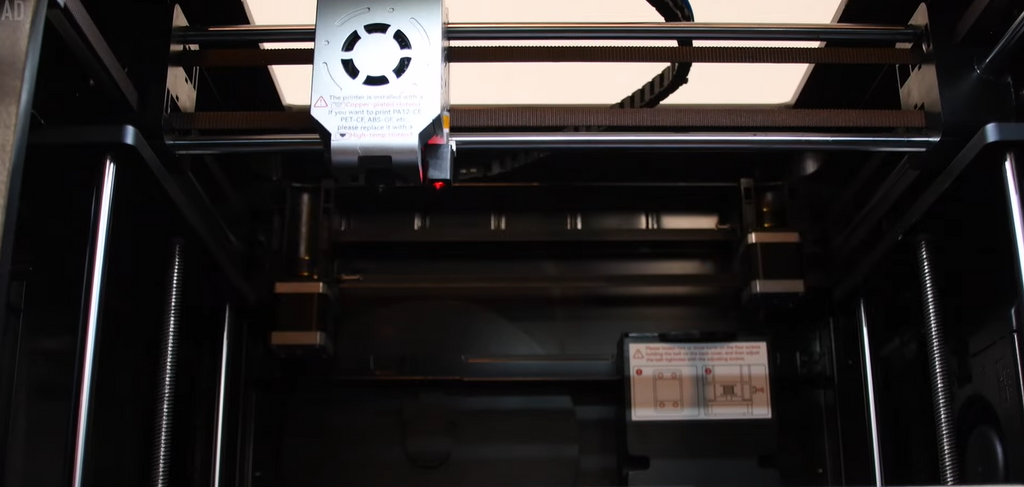
A printer enclosure contains heat, reduces drafts, improves print stability, and limits how quickly emissions spread into the room. This is especially useful for ABS, ASA, nylon, and other high-temperature materials.
But an enclosure is not a safety shield on its own. If the enclosure has no filter or exhaust, emissions still escape when the door opens or leak out gradually. For better control, pair the enclosure with active filtration or outdoor exhaust. Machines in the QIDI printer lineup ship fully enclosed, and the Plus 5 integrates a three-stage air filter (G3 pre-filter, H12 HEPA, and coconut-shell activated carbon) inside the chamber, which is the same particle-plus-VOC pairing described below.
4. Understand HEPA and activated carbon filtration
Not all filters do the same job, and this is the single most common misunderstanding in 3D printing safety.
- HEPA filtration captures fine particles. It does essentially nothing for gases and VOCs.
- Activated carbon adsorbs many VOCs and odors. It does not capture particles.
For 3D printing you need both, because printers emit both. The EPA's guide to air cleaners in the home covers how to size a unit for a room and why filters need replacing on schedule. A saturated carbon filter stops working long before it looks dirty.
5. Keep distance from the printer
Exposure depends partly on how close you are and how long you stay there. Do not sit directly beside a running printer for hours if you can avoid it. Place printers away from beds, dining areas, children's rooms, and high-traffic living spaces. For schools or offices, printers should sit in a dedicated, ventilated area rather than on a desk in a crowded room.
6. Do not use air fresheners as a safety solution
Candles, perfumes, essential oils, and air fresheners may cover the smell of 3D printing, but they do not remove ultrafine particles or VOCs. Some scented products add more VOCs to indoor air. If the room smells strongly after printing, the answer is not to mask the smell. Improve ventilation, use better filtration, change materials, or move the printer.
Can you sleep in the same room as a 3D printer?
It is better not to sleep in the same room as a running 3D printer, especially during long prints, resin printing, or ABS and ASA printing. Sleeping increases exposure time to six or eight continuous hours in an unventilated room, and you cannot respond quickly to a print failure, overheating issue, or odor buildup.
If you live in a small apartment, place the printer as far from your sleeping area as possible, improve ventilation, choose lower-emission materials, and finish high-emission jobs before bedtime. Avoid overnight resin or ABS printing in a bedroom.
Is it safe to leave a 3D printer unattended?
From an air-quality perspective, unattended printing can allow fumes to build up if the room is closed. From a general safety perspective, printers also include hot nozzles, heated beds, motors, wiring, and moving parts.
Many users run long prints, but basic precautions matter:
- Keep the printer on a stable, nonflammable surface.
- Keep paper, fabric, and clutter away from the printer.
- Keep the printer well maintained.
- Use smoke detection in the area.
- Avoid running unfamiliar materials overnight.
- Check the printer regularly during long jobs.
- Leave ventilation running for the whole job, not just while you are in the room.
Common myths about 3D printer fumes
Myth 1: If I cannot smell anything, it must be safe
Not true. Ultrafine particles have no smell at all, and several VOCs have odor thresholds well above concentrations of interest. Smell is an alarm, not a measurement.
Myth 2: PLA produces no emissions
PLA is lower concern than ABS, but published testing still puts it at roughly 65,000 particles/cm³ mean concentration, with around nine detectable VOC species.
Myth 3: An enclosure removes all fumes
An enclosure contains emissions. Without exhaust or filtration, it does not remove them, and it releases what it collected when you open the door.
Myth 4: Air fresheners solve 3D printer smell
Air fresheners mask odor and can add VOCs of their own. They do not address the underlying air-quality issue.
Myth 5: Only resin printers need ventilation
Resin printers need careful ventilation and chemical handling, but filament printers also release VOCs and ultrafine particles.
FAQs about 3D printer fumes
Are 3D printer fumes toxic?
3D printer fumes contain VOCs and ultrafine particles, and some of those VOCs (styrene from ABS, for example) are known irritants. Whether a given setup is harmful depends on material, exposure time, room volume, ventilation, and individual sensitivity. Treat the sensible goal as reducing exposure rather than deciding the fumes are either poison or nothing.
Do 3D printers release toxic fumes with PLA?
PLA releases fewer particles and fewer VOC species than ABS, but not zero of either. Published means put PLA around 65,482 particles/cm³ against 300,980 for ABS. PLA in a ventilated room is a low-concern setup; PLA running 12 hours a day in a closed bedroom is not.
Are ABS filament fumes worse than PLA?
Yes, on every published metric: roughly 4–5x the particle number concentration, more detectable VOC species, and styrene among them. ABS should be printed in an enclosure with either filtration or outdoor exhaust, and not in a bedroom.
Is PETG toxic when printed?
PETG sits close to PLA in emission terms: low to moderate particles, mild VOCs, and little odor. It prints hotter than PLA, so ventilate long jobs, but it does not need the ABS-level precautions.
Do I need an air purifier for 3D printing?
An air purifier helps if it combines HEPA for particles with activated carbon for VOCs, and if it is sized for the room. A HEPA-only unit will not touch the styrene smell from ABS. Ventilation or source capture should come first; a purifier is a supplement.
Does a 3D printer enclosure stop fumes?
No. An enclosure contains and slows the spread of emissions and improves print quality on high-temperature materials, but only a filter or an exhaust duct actually removes anything from the air.
How long should I ventilate after a print finishes?
Particle concentrations fall once extrusion stops, but ultrafine particles stay suspended for a while and warm plastic keeps off-gassing as it cools. Leaving ventilation or filtration running for 20–30 minutes after the job ends is a reasonable habit, and longer for ABS, ASA, or resin work.
Final thoughts
3D printing is useful and accessible, but it should be treated like any indoor process that heats plastics or uses chemicals. The goal is not to be afraid of every print. The goal is to understand the risks and control them sensibly.
For most users, safer habits make a big difference: choose appropriate materials, ventilate the room, avoid long exposure in small spaces, use enclosures and filters together rather than either alone, and handle resin with care. With the right setup, 3D printing is far more comfortable and lower-risk in homes, classrooms, offices, and workshops. For the wider safety picture beyond air quality, see the 3D printer safety guide.
- Are 3D printer fumes harmful?
- What are 3D printer fumes?
- What the measurements actually show
- Are 3D printer fumes bad for you?
- 3D printer fume risks by material
- Is PLA safe to print indoors?
- Are ABS fumes dangerous?
- Are resin printer fumes harmful?
- How to reduce 3D printer fumes
- 1. Choose lower-emission materials when possible
- 2. Improve ventilation
- 3. Use an enclosure correctly
- 4. Understand HEPA and activated carbon filtration
- 5. Keep distance from the printer
- 6. Do not use air fresheners as a safety solution
- Can you sleep in the same room as a 3D printer?
- Is it safe to leave a 3D printer unattended?
- Common myths about 3D printer fumes
- Myth 1: If I cannot smell anything, it must be safe
- Myth 2: PLA produces no emissions
- Myth 3: An enclosure removes all fumes
- Myth 4: Air fresheners solve 3D printer smell
- Myth 5: Only resin printers need ventilation
- FAQs about 3D printer fumes
- Are 3D printer fumes toxic?
- Do 3D printers release toxic fumes with PLA?
- Are ABS filament fumes worse than PLA?
- Is PETG toxic when printed?
- Do I need an air purifier for 3D printing?
- Does a 3D printer enclosure stop fumes?
- How long should I ventilate after a print finishes?
- Final thoughts
Recommended products